
IPTV Without Freezes: The Ultimate Solution to Avoid IPTV Buffering
What is buffering?

In the context of IPTV, buffering is equivalent to a short pause during streaming. Unlike traditional television, where content flows continuously, IPTV sends data in packets. These packets allow brief intermediate storage, ensuring that even during minor Internet issues, the viewing experience remains uninterrupted for a few seconds.
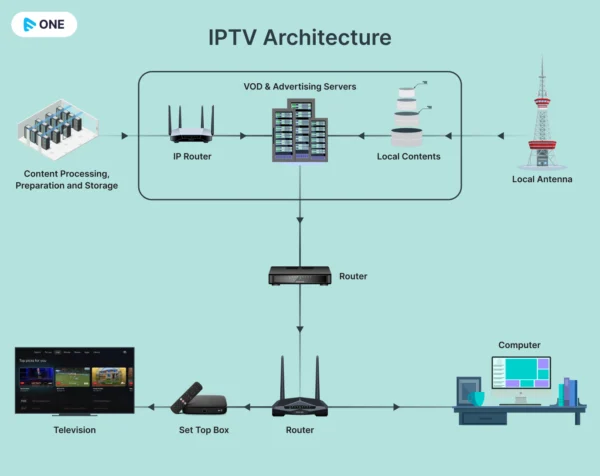
Understanding this process is essential for addressing buffering-related issues. The challenge lies in the interaction between IPTV servers — which send the data packets — and your device, which waits for these packets to maintain smooth streaming. If there are delays in sending, receiving, or processing these packets, the result is buffering: a pause while your device waits for the next data delivery.
What Causes Buffering?
Buffering issues often stem from a congested network. Think of your network as a highway — the more vehicles (devices) using it, the slower the traffic (data flow). Devices like computers, gaming consoles such as the PS4, phones, and tablets all compete for bandwidth, which can lead to longer loading times for IPTV services and providers.
Identifying and resolving this bottleneck is essential. Disconnecting unnecessary devices is a quick fix — it instantly frees up bandwidth, allowing your IPTV stream to travel across the network highway more smoothly. It’s like clearing a busy intersection to ensure faster, uninterrupted traffic flow.
Simple Tips to Enjoy IPTV Without Freezes or Interruptions
When you face buffering issues, there are several simple actions you can take to reduce the time spent staring at the loading screen. By following one or more of the tips below, you can greatly minimize buffering during your IPTV streams.
Device Management
When managing your devices, prioritize quality over quantity. Evaluate which devices are essential for your immediate needs and disconnect those that aren’t actively being used. This quick action instantly improves your network’s bandwidth allocation, allowing smoother IPTV streaming.
Restart Your Router and Device
Restarting may seem trivial, but it can have a major impact. Over time, the connection between your router and your device can become unsynchronized, causing data transmission issues. Restarting refreshes this connection — like turning a faucet off and on to restore steady water flow — letting you enjoy IPTV without interruptions.
Use a Wired Connection
While wireless connections are convenient, they can be prone to interference and slowdowns, especially during peak hours. Connecting your IPTV box via an Ethernet cable provides a more stable data path — like having a dedicated lane on the Internet highway.
Understand Your Internet Speed Requirements
Internet speed is crucial for smooth IPTV streaming. Knowing the minimum recommended speeds for different content resolutions is essential — it’s like ensuring your car has enough fuel for optimal performance. Compare your current speed to these recommendations:
- 4 Mbps for SD content
- 6 Mbps for HD content
- 25 Mbps for Ultra HD content
Customize Buffer Settings
Some IPTV devices allow users to adjust buffer settings. Increasing the buffer size lets your device download more data in advance, providing a safety margin during temporary slowdowns. It’s like having a reserve tank to keep your stream running smoothly.
Switch to SD Channels
If buffering persists, consider switching to standard definition (SD) channels. These require less data and can provide a smoother streaming experience, especially on slower connections.
Be Aware of ISP Redirection
Internet Service Providers (ISPs) sometimes reroute data through less congested paths. While this helps maintain the overall health of the network, it can occasionally slow down your individual connection. Understanding this is like knowing there’s a detour on your usual route — temporary but manageable.
Run Speed Tests Regularly
Running speed tests periodically is like checking your car’s speedometer. It gives you a clear picture of your Internet connection’s performance and helps identify potential issues. Think of it as a diagnostic tool to ensure your Internet highway is clear and fast.
Prefer a Wired Connection
A wired connection to your router acts like a VIP lane on the Internet highway. It ensures faster and more stable connectivity compared to wireless options. If your router is far from your IPTV device, consider using powerline adapters, which extend your network through your home’s electrical wiring — your extended VIP lane for smooth IPTV streaming.
Adopt the Best Connection Technology
Preparing your IPTV setup for the future is like upgrading your vehicle to handle new road conditions. Stay updated with your ISP’s latest offerings, explore new hardware that supports higher bandwidth, and consider upgrading your Internet plan to meet the increasing demands of high-quality video streaming.
Final Thoughts
Solving IPTV buffering issues requires a mix of technical understanding and practical adjustments. From optimizing your device connections to staying informed about ISP practices, each step contributes to a better IPTV experience. With these strategies, you’ll be fully equipped to tackle buffering problems and transform your IPTV setup into a hub of uninterrupted, high-quality streaming.
Get a free trial of our service!
Subscribe now!