
IBO Player: Complete Setup and Activation Guide

IBO Player is one of the best IPTV apps for Smart TVs available today. It has quickly become the perfect replacement for Duplex Play, which was removed from Samsung and LG app stores.
If you’re looking for a reliable and powerful IPTV player, IBO Player is an excellent solution for streaming live TV, movies, and series.
Note: IBO Player does not provide any channels or playlists. You’ll need to add your own M3U link or Xtream Codes from your IPTV provider — for example, VistarStream.
Get a Free VistarStream Trial
Subscribe Now
Why Choose IBO Player?
This Player is one of the most stable, fast, and user-friendly IPTV players for Smart TVs, Android devices, and Fire Stick.
It offers a clean, modern interface, excellent performance, and is compatible with multiple platforms — including Samsung Smart TVs, LG Smart TVs, Android TV, and Amazon Fire Stick.
Learn more about how IPTV works on Wikipedia.
Key Features of IBO Player
Here’s why this Player stands out among other IPTV players:
VLC-based playback engine for smooth and fast streaming
Customizable themes for a personalized interface
Simple and intuitive navigation for all users
Metadata and poster support for movies and series
Subtitle language selection for full flexibility
Multiple playlist support with PIN protection
Two setup options: M3U link or Xtream Codes integration
How to Set Up IBO Player (Step-by-Step)
Setting up this Player is easy. Just follow the steps below to integrate your IPTV playlist or subscription.
Step 1: Install IBO Player
Download IBO Player from your Smart TV app store or Google Play Store.
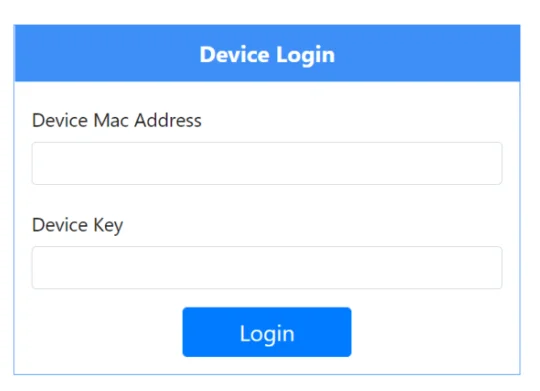
Open the app to get your MAC Address and Device Key (you’ll need these to link your device online).
Step 2: Link Your IPTV Account
Enter the MAC address and Key displayed on your TV.
Choose your preferred setup method:
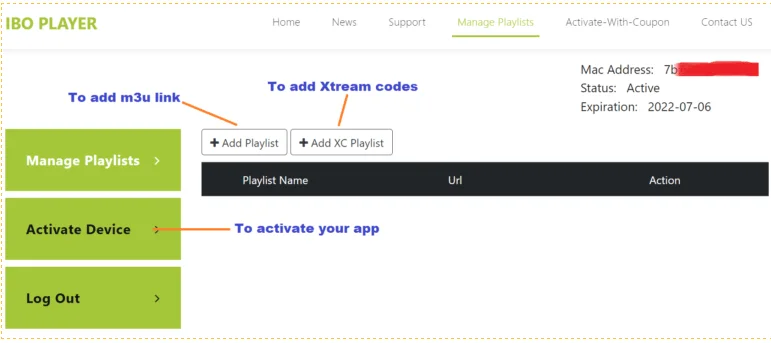
Option 1: Using an M3U Playlist
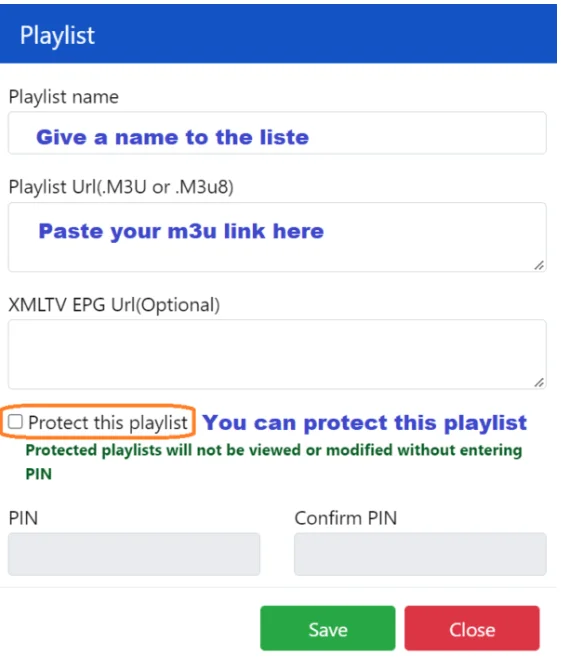
Playlist Name: Create a name for your playlist (e.g., Vistarstream USA).
Playlist URL (M3U/M3U8): Paste your M3U link here.
EPG XMLTV URL (optional): Add your EPG guide link if you have one.
PIN Protection: (Optional) Secure your playlist with a PIN.
Option 2: Using Xtream Codes
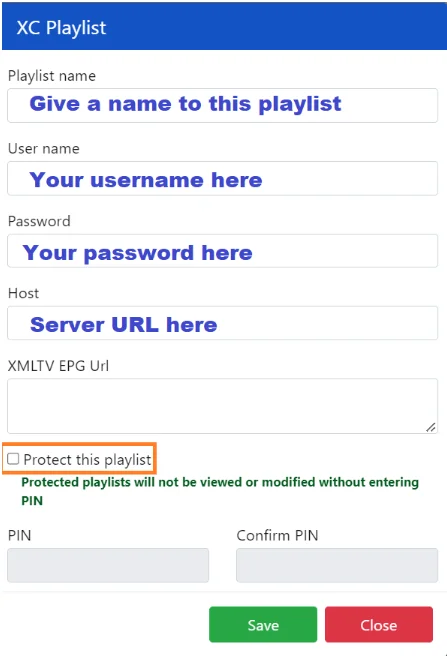
Playlist Name: Enter a name.
Username: Your IPTV username.
Password: Your IPTV password.
Host: Server URL provided by your IPTV service.
EPG XMLTV URL (optional): Add your EPG guide link if available.
PIN Protection: Optional for extra security
After adding your playlist, return to your Smart TV and restart IBO Player — your channels will now appear automatically.
How to Activate IBO Player
This Player offers a 7-day free trial for new users — similar to other popular IPTV players like FLIX IPTV and SET IPTV.
If you enjoy using it, you can purchase a lifetime license for only €8 (one-time payment).
To activate your device:
Open the IBO Player app on your TV.
Select “Activate Device.”
Fill out the activation form with your personal details.
Complete payment using one of the available options.
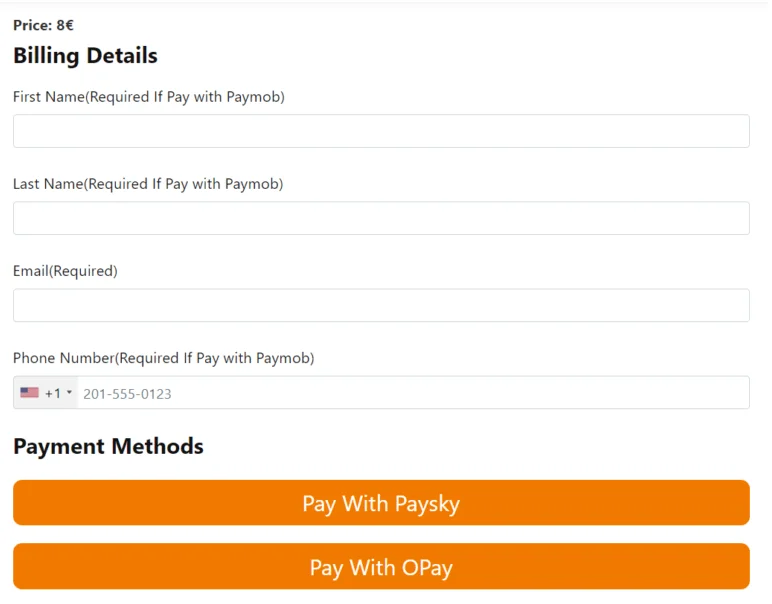
Billing Details Required
Full Name
Last Name
Email Address
Phone Number (if required for Paymob)
Payment Options
💳 Pay with Paysky
💳 Pay with OPay
Once activated, your IBO Player app will unlock permanently.
Our Opinion
IBO Player is a powerful, reliable, and versatile IPTV player, especially recommended for Smart TV users.
It handles large playlists efficiently and provides a smooth, buffer-free experience, making it a top choice for IPTV enthusiasts.
For Android or iOS devices, there are other great alternatives, but IBO Player remains one of the best for Smart TVs.
Get a Free Vistarstream Trial
Subscribe Now