
How to set up a Firestick to access unlimited streaming (2025 guide)
The Amazon FireStick is a powerful streaming device, but what if I told you it can do even more? If you unlock (or jailbreak) it, you’ll gain access to a whole new world of apps and content. Today, I’ll explain this process step by step in simple, practical terms.
What does it mean to jailbreak a FireStick?
Jailbreaking a FireStick simply means removing the restrictions that prevent you from installing third-party apps. These apps aren’t available in the Amazon Store and can offer movies, live sports, and more from both free and paid sources. Don’t worry — it’s completely safe. Your device won’t lose its warranty, and the process is fully reversible.
Think of jailbreaking your FireStick as giving it the freedom to reach its full potential. It doesn’t hack or damage your system — it just opens the door to new possibilities. Once you do it, you’ll wonder how you ever lived without it.
Why should you jailbreak your FireStick?
The FireStick is great, but jailbreaking it takes it to another level. Here are the reasons why you should consider it:
Gain access to new apps: Imagine apps like IPTV Smarters Pro or KODI. These aren’t available in the Amazon App Store, but with jailbreaking, you can download them directly.
Save money: Forget about expensive subscriptions. With access to a variety of sources, you can stream content for free or at a very low cost.
Enjoy more content: Get movies, sports, shows, and live TV from a wide range of apps. Your entertainment options will feel endless.
Get a free trial of our service!
Subscribe Now!
How to enable installations from unknown sources?
Before you start installing apps, let’s make sure your FireStick is ready to accept them. It’s a quick process.
- Turn on your FireStick and go to Settings on the home screen.
- Select My Fire TV and click on it.
- If you see Developer Options, open it. If not, go to Settings > My Fire TV > About and highlight your FireStick’s name. Press the Select button seven times — the Developer Options menu will now appear.
- Enable Apps from Unknown Sources. This setting allows you to install third-party applications.
Now you’re ready to unlock the full potential of your FireStick.
Installing IPTV Smarters Pro with Downloader
Let’s move on to the exciting part — adding IPTV Smarters Pro. It’s one of the best apps for IPTV services.
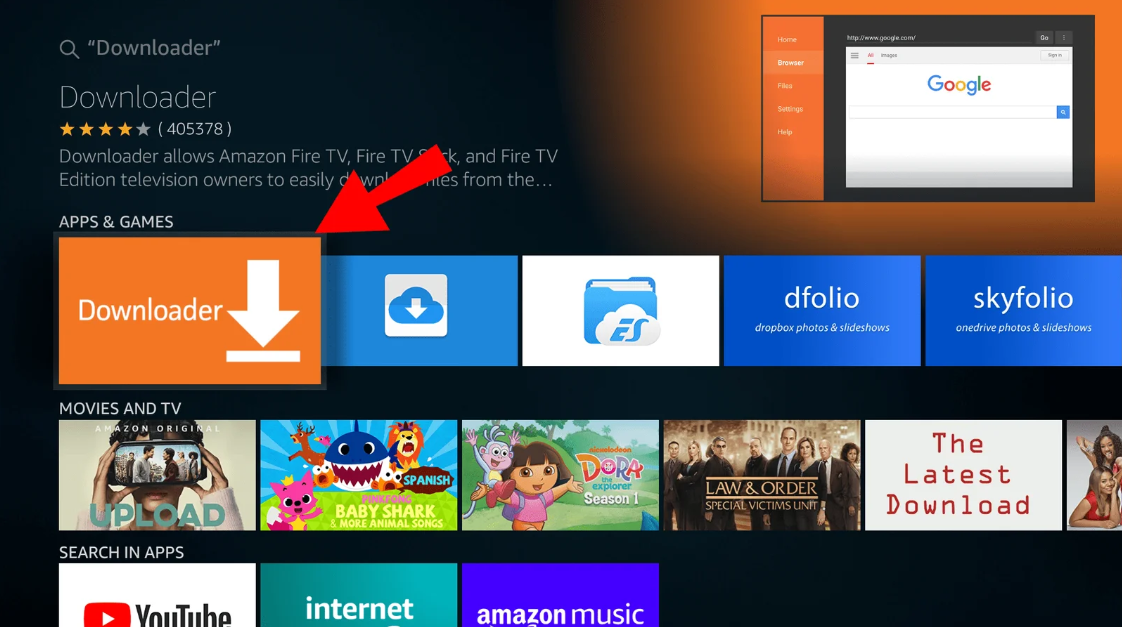
- Start by downloading the Downloader app.
- Go to the Search section on your FireStick home screen.
- Type “Downloader” and install it.
- Open the Downloader app.
- When prompted, grant the necessary permissions.
- In the URL field, type
78522and press “Go.”- This code will download the IPTV Smarters Pro APK file.
- Once the download is complete, a pop-up window will appear.
- Click “Install.”
- When the installation finishes, press “Open” to launch the app.
That’s it! You now have IPTV Smarters Pro installed on your FireStick.
Setting up IPTV Smarters Pro
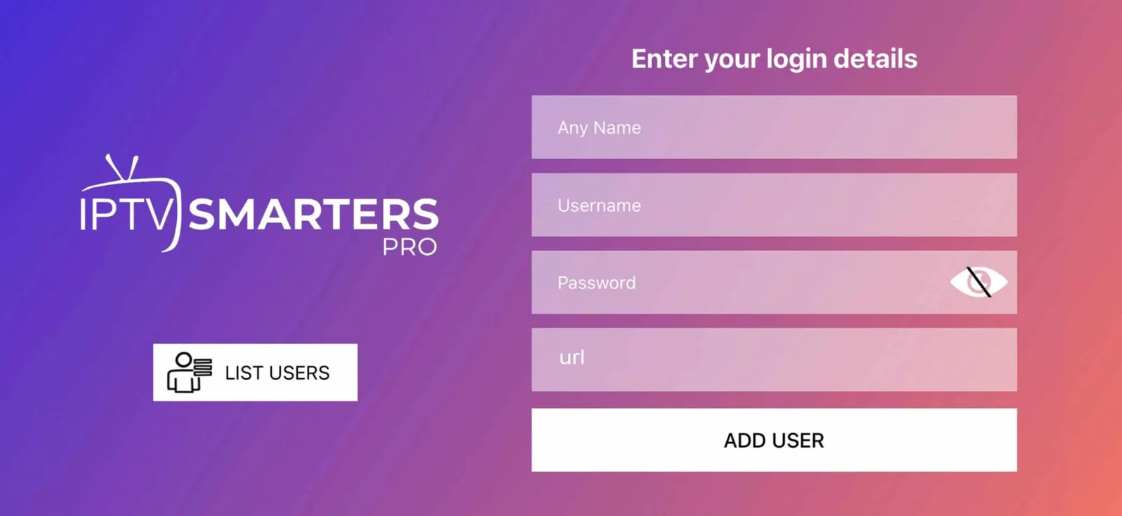
Now that the app is installed, you’ll need to sign in using your IPTV provider’s credentials.
Open IPTV Smarters Pro from your apps list.
Choose your login method. Most IPTV providers support signing in with Xtream Codes API, but you can also use an M3U URL if available.
Enter your details:
Username, Password, and Server URL provided by your IPTV service.
Click “Add User” to complete the setup.
Once you’ve signed in, explore the categories — Live TV, Movies, and Series. The world of streaming is now at your fingertips.
Using a VPN isn’t mandatory, but it’s highly recommended. Why? It improves your streaming experience in three main ways:
Protects your privacy: Your IP address remains hidden, keeping your online activity private.
Bypasses restrictions: Access content that may not be available in your country.
Prevents throttling: Some ISPs slow down streaming speeds, but a VPN helps avoid this issue.
Reliable VPNs like ExpressVPN or NordVPN work great with FireStick. They’re easy to install and give you peace of mind while streaming securely.
Final thoughts: Why jailbreak a FireStick?
Unlocking your FireStick is like turning a standard tool into a Swiss Army knife. You’ll gain access to more apps, avoid unnecessary subscriptions, and enjoy unlimited entertainment.
Plus, the process is simple, safe, and completely reversible.
When you pair your jailbroken FireStick with a VPN, you can stream securely and without limits. So why wait? Dive in, follow this guide, and transform your streaming experience.
Get a free trial of our service!
Subscribe Now!