
SET IPTV: Setup and Activation Methods
SET IPTV is an application available in Smart TV app stores for Samsung (Tizen OS), LG (Web OS), and also for Android devices.
It stands out for its simplicity, performance, and compatibility with various IPTV service formats, making it one of the most reliable choices for IPTV users who value speed and stability.
Here are some of the main features of SET IPTV:
- Easy to set up: The app offers a straightforward and user-friendly installation process, ideal even for beginners.
- High-performance video encoder: Ensures smooth playback with excellent video quality and minimal buffering.
- Supports Xtream Codes and M3U links: Compatible with both playlist and API-based connections, giving users flexible options to connect their IPTV service.
- Cross-device compatibility: Works seamlessly across multiple Smart TV brands and Android-based streaming devices.
- Stable and secure performance: Optimized for long viewing sessions without freezing or lagging.
Whether you’re a casual viewer or a dedicated IPTV user, SET IPTV combines performance, simplicity, and flexibility to deliver a superior streaming experience. To download or learn more, visit the official SET IPTV website
Setup Methods in SET IPTV:
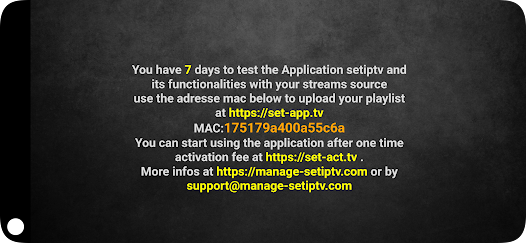
- Once the installation is complete, open the SET IPTV app — you’ll see your MAC address displayed on the screen.

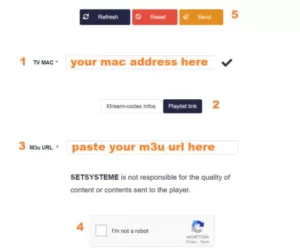
- Open this link in your browser: https://setsysteme.com/set.app and enter the MAC address from the app in the TV MAC field.
- Select the “Playlist Link” method, then copy and paste the M3U URL you received into the “M3U URL” field.
- Check the “I’m not a robot” captcha box and click the “Send” button.
- Restart your TV and reopen SET IPTV to load your channel and VOD list.
Method Using Xtream Codes:
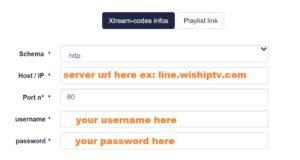
Just like the first method (M3U link), follow the same steps — but in the third step, click on “Xtream Codes Information” to display the fields where you’ll need to enter your subscription details.
Activation of SET IPTV:
SET IPTV offers a 7-day free trial when you launch the app for the first time. After this period, you’ll need to make a one-time payment of €15 to activate it for lifetime access.
The activation of SET IPTV is done directly on the developers’ official website. Here’s the direct link:
SET IPTV: Questions and Answers
Why doesn’t SET IPTV load the EPG?
If the app doesn’t load the EPG (Electronic Program Guide) using the M3U method, it’s usually due to the format or sync delay of your playlist. To fix this, try reconfiguring your subscription using the Xtream Codes method, which ensures faster synchronization and more accurate program data.
Additionally, make sure your IPTV provider includes an EPG link in your playlist — some providers do not, which can cause the EPG not to display. If the problem persists, try refreshing your playlist or restarting the app after clearing the cache.
Can I use an external player instead of the default one?
Currently, it’s not possible to use an external player with SET IPTV. The app is optimized to run exclusively with its built-in player, ensuring maximum stability, smooth playback, and high-quality video output.
While you can’t change the internal player, you can still adjust buffering settings or test different connection types (Ethernet or Wi-Fi) to improve your viewing experience.
How long does the free trial last?
SET IPTV offers a 7-day free trial for all new users. During this period, you can explore the app’s full functionality, test playlist performance, and verify compatibility with your IPTV provider before activation.
After the trial expires, you’ll need to make a one-time payment of €15 to activate the app permanently — no monthly or yearly fees.
Can I use the same license on multiple devices?
No, each license is linked to a specific MAC address. If you change your Smart TV or switch to another device, you’ll need to purchase a new license to activate SET IPTV again.
However, if you reset your TV or reinstall the app on the same device, your license remains valid as long as the MAC address doesn’t change.
Does SET IPTV work without Internet?
No. Like all IPTV applications, SET IPTV requires an active Internet connection to stream content. It’s recommended to have a minimum speed of 25 Mbps for HD and 4K streaming to avoid buffering or interruptions.
For best performance, use a wired Ethernet connection instead of Wi-Fi, as it provides greater stability.
This guide will help you set up, activate, and optimize SET IPTV on your Smart TV or Android device quickly and easily. With proper configuration, you can enjoy uninterrupted access to live TV, movies, and on-demand content with the best possible streaming quality.
Get a Free Trial of Our Service!
Subscribe Now!