SMARTONE IPTV: How to Install It on Your Smart TV?

What Is SMARTONE IPTV?

Smart One IPTV is one of the most powerful and reliable IPTV players available today, designed to deliver a seamless streaming experience for users who want access to live TV channels, movies, and on-demand content all in one place. Unlike traditional cable or satellite systems, Smart One IPTV works through an internet connection, allowing you to enjoy your favorite programs on Smart TVs, Android devices, and more without the need for extra hardware.

One of the standout advantages of Smart One IPTV is its clean and intuitive interface, which makes navigation simple even for first-time users. You can easily organize your playlists, categorize your channels, and even save your favorite ones for quick access later. The app supports multiple playlist formats, including M3U and Xtream Codes, offering great flexibility regardless of your IPTV provider.

While the application itself doesn’t provide content — meaning you’ll need to connect it to an existing IPTV subscription — its compatibility and performance make it one of the most popular choices for IPTV users in 2025. It also supports multi-language streaming, custom themes, and parental control features, giving you complete control over your viewing experience.

Whether you’re streaming live sports, catching up on the latest shows, or exploring international TV, Smart One IPTV offers smooth playback, fast loading, and a professional-grade experience tailored for every user. It’s the perfect balance between power, performance, and personalization — making it a must-have app for anyone looking to transform their Smart TV into an all-in-one entertainment hub.

This application is compatible with Smart TVs such as Samsung and LG, as well as any Android device. The app is not free — to activate it for lifetime access, you’ll need to pay €12.99, or just €2.55 for a one-year subscription.

SmartOne IPTV: Features

  • It allows streaming in multiple languages.
  • It supports different user accounts.
  • It features an advanced video player with all the essential options — play, resume, pause, rewind, and fast forward.
  • You can save your list of favorite channels and access them quickly anytime.
  • You can also configure and customize the app to suit your preferences.

How to Install an IPTV Subscription on the SmartOne IPTV Player

  1. Go directly to this link: SmartOne IPTV (link).
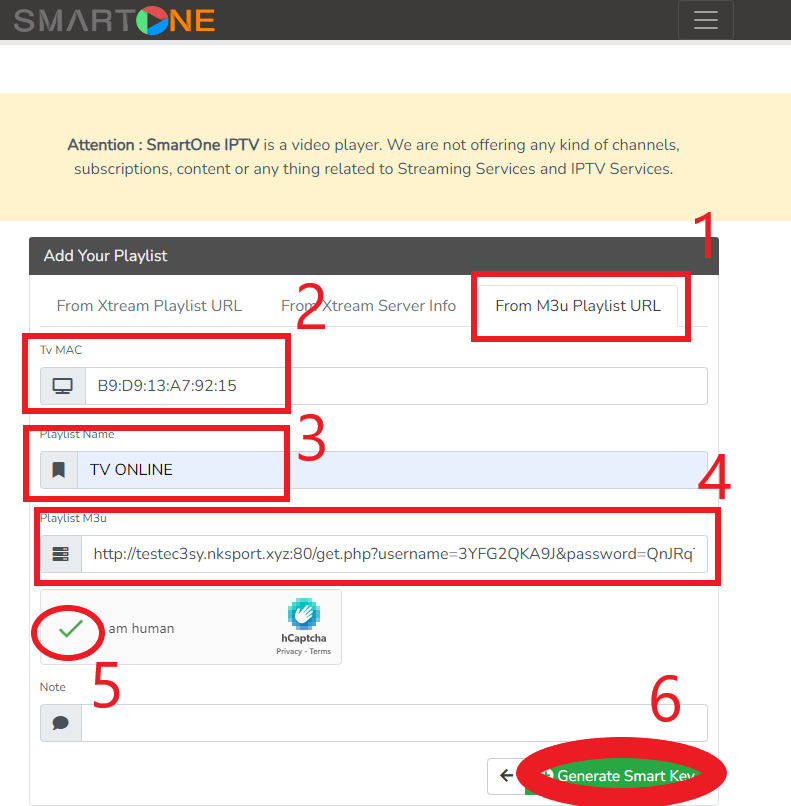
  2. To add the M3U link, use the last tab: “From M3U Playlist URL.”
  3. Enter your MAC address in the designated field.
  4. Playlist Name: Type, for example, IPTV SMART PREMIUM (link).
  5. In the M3U Playlist box, paste your M3U link.
  6. Check the box “I’m not a robot.”
  7. Leave the Notes field empty.
  8. Then click on Generate Smart Key.
  9. Now, refresh or restart the SmartOne IPTV app.
  10. Choose Direct Channel Selection and enjoy your favorite shows!
     

Activate the SmartOne IPTV App:

  • Download Smart One IPTV on your preferred device.
  • Launch the app and note down the MAC address displayed on the screen.
  • Open any browser on your PC and go to the activation page (link).
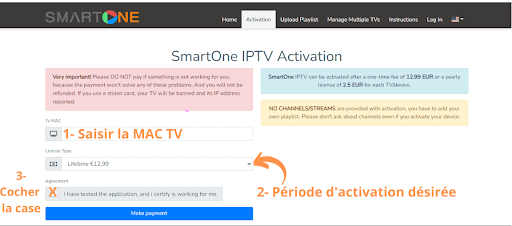
  • On the activation page, enter your MAC address and select the type of activation you prefer.
  • Check the “Agreement” box.
  • Finally, click the Payment button to complete the activation.

And this is the final step of our tutorial — Smart One IPTV is now successfully activated.

Get a free trial of our service!
Subscribe Now!