
Vistar Stream: Complete instructions for installing the application (2025)
Net IPTV is an outstanding alternative to Smart IPTV, offering users a sleek, easy-to-navigate interface, exceptional performance, and a highly stable player codec that guarantees smooth and uninterrupted streaming at all times.
The application is fully compatible with all Samsung Smart TVs from 2016 onward (Tizen OS) and LG Smart TVs (WebOS). It can also be conveniently installed on Android, iOS, and Fire Stick devices, either through the Play Store or via direct download.
Thanks to its flexibility and optimized design, Net IPTV delivers a seamless viewing experience across multiple platforms. Whether you’re watching live channels, on-demand movies, or international content, it provides consistent high-quality streaming. For users looking to upgrade their entertainment setup with a dependable and feature-rich app, Net IPTV stands out as one of the most trusted choices available.
Net IPTV continues to gain popularity among streaming enthusiasts thanks to its reliable performance, frequent updates, and user-focused interface. It eliminates buffering issues, supports multiple playlist formats, and offers smooth navigation even with large channel lists. Whether for movies, sports, or live TV, Net IPTV ensures a premium streaming experience tailored for every type of viewer.
Features of Net IPTV
Net IPTV is one of the IPTV applications that allows you to download the M3U playlist and stream it on your Smart TV. Here are some of its main features:
- Supports M3U links.
- You can access multiple playlists (M3U links).
- Offers an improved search option.
- Allows you to add channels to your favorites list.
- Supports subtitles and available streaming languages.
Get a free trial of our service!
Subscribe now!
How to set up a subscription in Net IPTV
1 – After installation, launch the application to find your MAC address. If it is not displayed on the interface, click the red button to show it.
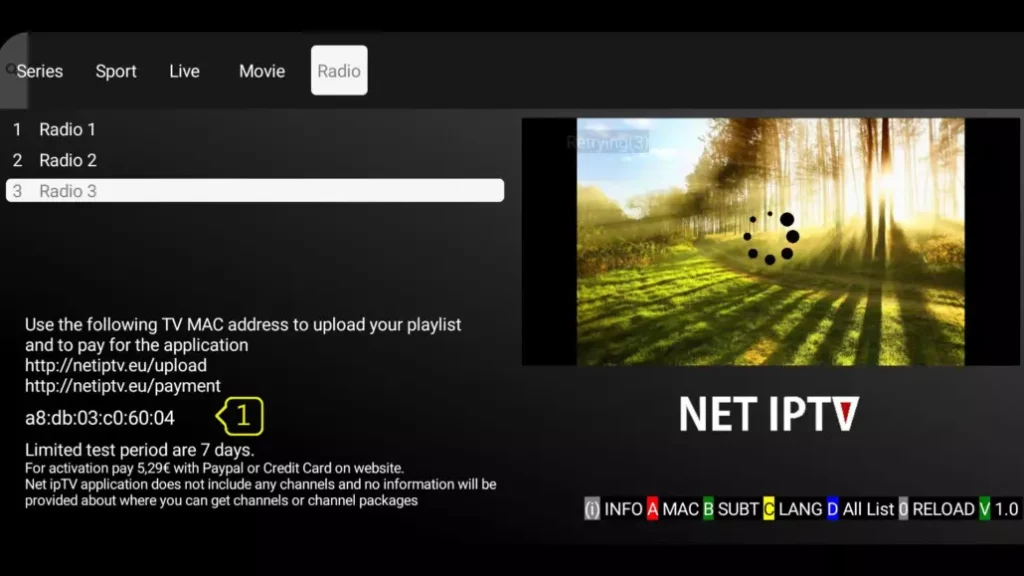
2 – After retrieving the MAC address from your application, go to this link: https://www.netiptv.eu/Upload
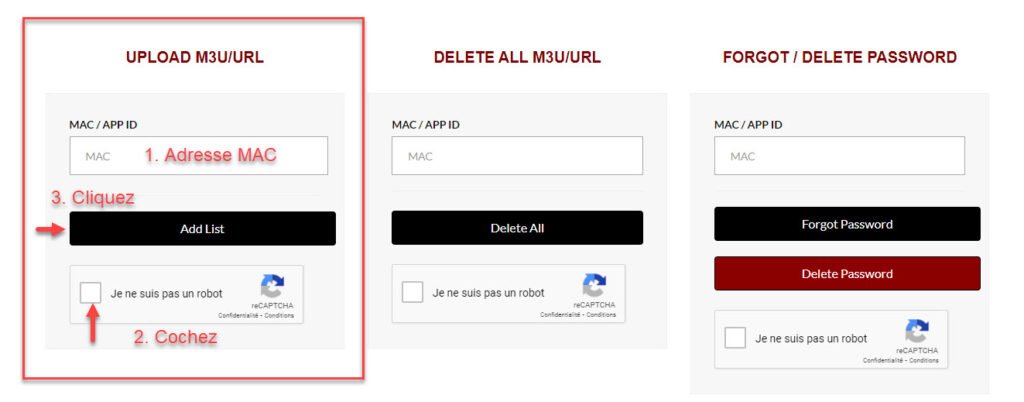
3 – On the website, enter the MAC address of your Net IPTV application, complete the Captcha, and then click on Add List.
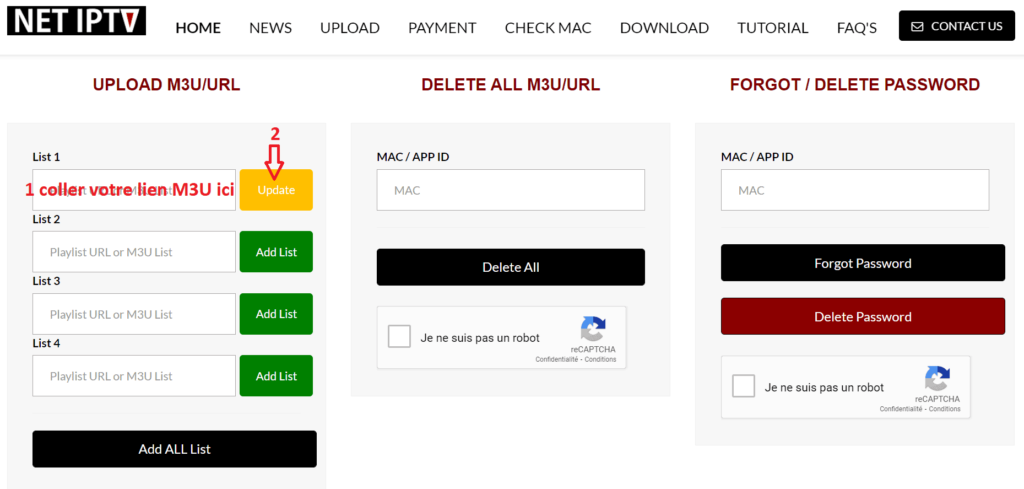
4 – On the next page, paste your M3U link and click on Add List. If you see a yellow button labeled “Update”, it means that a playlist already exists in your application.
Please note that you can add up to four playlists (M3U links) to the Net IPTV application.
5 – The final step is to return to your Smart TV and restart the Net IPTV application to load the playlist. You can also press the number 0 on your remote control to refresh and reload the list.
The Net IPTV application is not free, but it offers a 7-day trial period. Once the trial ends, you can continue using it by choosing one of the following activation plans:
24 months (2 years) for €5.79
Lifetime access for €13.79
Here is the direct link to the activation page: https://netiptv.eu/Payment
To activate your application, choose one of the two plans and accept the activation and payment terms (“I accept the activation and payment terms of Net IPTV”). Then, enter your email address and the MAC address of your Net IPTV application. Don’t forget to complete the Captcha before clicking on “Click to PAY.”
On the payment page, fill in the required information and confirm to complete your activation purchase.